david_wendelken
Active Member
- Joined
- Mar 30, 2023
- Messages
- 944
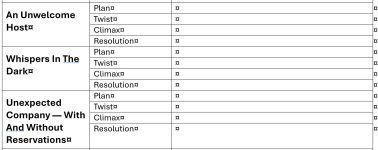
Based on the video, I just made a document listing each chapter. Now, a scene and a chapter are not the same, but I often start a new scene at the start of a chapter. If a chapter has more than one scene, I'll add more scene lines (and probably a scene title for scenes in that chapter). My starting format looks like the attached document. My goal is to fill it in for each scene over the next week or so.
Why?
Well, it's a handy record of what's where, in case I need it later when working on later books in the series.
But most importantly, if I don't know what needs to go in one of those blanks, it's probably because the scene needs more work. I think this will be the most efficient way of figuring that out and tracking whether I fixed it. If I discover a blank text box should be empty (i.e., there is no twist in the scene), then I can grey it out. Otherwise, it's missing info I need to add to the scene.
Hope you find this useful. I think it will help me tell any kind of story well. I'll be curious about whether you find it useful also.
Why?
Well, it's a handy record of what's where, in case I need it later when working on later books in the series.
But most importantly, if I don't know what needs to go in one of those blanks, it's probably because the scene needs more work. I think this will be the most efficient way of figuring that out and tracking whether I fixed it. If I discover a blank text box should be empty (i.e., there is no twist in the scene), then I can grey it out. Otherwise, it's missing info I need to add to the scene.
Hope you find this useful. I think it will help me tell any kind of story well. I'll be curious about whether you find it useful also.